zep@server: ~/en/services/website-support/website-security-malware-removal
$ site scan --malware

Website Security & Malware Removal: Hacked Website Repair on Any Platform

entry point | backdoor | spam pages
✓ Cleaned, vulnerability closed

Website security and malware removal is the service of cleaning malicious code from a hacked website, closing the attacker's entry point and hardening the site so that the same attack cannot repeat. We work on custom PHP and Node.js software, static sites, e-commerce and WordPress. In an emergency we respond within 4 hours and deliver a root-cause report after the clean-up.

// How can you tell your website has been hacked?

A hacked website often reveals itself to Google, the hosting company or customers before the owner notices. Attackers usually want to use a site quietly rather than take it down, so the home page can look normal while spam pages are generated in the background. If you see any of the signs below, the site needs investigating and cleaning.

  • Google search results show "This site may be hacked", or the browser displays a red security warning
  • Search results list pages you never created, titles in Japanese characters, or pharma and gambling spam
  • Visitors, especially those on mobile or arriving from Google, are redirected to other sites
  • Your hosting provider has suspended the site for "malicious content" or restricted the account
  • Emails sent from your domain land in spam folders or bounce
  • There are unfamiliar files, admin accounts or scheduled tasks on the server

Redirects can be shown only to certain visitors, so the site may look perfectly normal when you open it yourself. The Security Issues report in Search Console is usually the first place these hidden signs appear.

// How is a hacked website cleaned?

A hacked website is cleaned by finding and closing the attacker's way in, not just by deleting malicious files; as long as the entry point stays open, a cleaned site is soon reinfected. The response has four steps and a typical case takes 2 to 3 working days. We first back up the site in its current state, verify the clean-up on a copy and release it to the live site during low-traffic hours.

01

First response and isolation (within 4 hours)

The situation is assessed and the site put into maintenance mode if needed; admin, FTP and database passwords and API keys are changed

02

Diagnosis and entry point (1 day)

Changed files, server access logs and the database are examined to establish which vulnerability was used and what was altered

03

Clean-up and closure (1 day)

Backdoors, injected code and spam pages are removed, the vulnerability is closed and spam URLs are set to return 404 or 410

04

Google review request and report (half a day)

A review is requested in Search Console and a root-cause report explaining the entry point and the work done is delivered

Google's review usually takes a few days for malware and can take several weeks for spam; we follow the steps in Google's guide to hacked sites. If the attacker gets back in through the same vulnerability within 7 days of delivery, we handle it free of charge.

// Which vulnerabilities appear in custom-built software?

In custom PHP and Node.js software, vulnerabilities mostly come from the code itself: places where user input reaches the database, the page or the file system without being checked. These are the types we encounter most often.

  • SQL injection: queries built by string concatenation instead of parameters can expose the entire database
  • XSS (cross-site scripting): comments, search terms or form input printed without escaping run the attacker's code in visitors' browsers
  • File upload flaws: uploads without type and extension checks are the shortest route to placing an executable script on the server
  • Exposed files: .env files, .git folders, database dumps or .zip backups left in the web root, whose passwords and API keys can be downloaded directly
  • Authentication and authorisation errors: unlimited login attempts, guessable admin URLs and IDs that open other users' records

We structure the review around the categories of the OWASP Top 10, and every finding is reported with a severity rating and a recommended fix. If closing a vulnerability requires code changes, we can make them or specify them technically for your own developer.

// What does preventive website security cover?

Preventive website security consists of layers that make the attacker's job harder and limit the damage if an attack does succeed; no single plugin or tool provides this alone. After a clean-up, or on a site that has never been attacked, we put the following layers in place.

  • Updates: regular updates to core software, libraries, packages and server software, and replacement of abandoned dependencies
  • WAF and rate limiting: a firewall that stops known attack patterns and brute-force logins before they reach the application
  • Security headers: HSTS to enforce HTTPS, a CSP that only runs scripts from approved sources, X-Content-Type-Options and Referrer-Policy
  • Backup strategy: automated backups with at least one copy kept off the server and restores that have actually been tested
  • Access management and 2FA: a separate account for each person, least privilege, and two-factor authentication for the admin area and server access

The risk is not only downtime. If form, account or order data leaks, UK GDPR and EU GDPR require you as the data controller to report a notifiable breach to the regulator, such as the ICO, within 72 hours of becoming aware of it. That is why, on sites holding personal data, we also treat not storing unnecessary data and keeping access logs as part of security. For the WordPress side of backups, see WordPress Backup & Restore.

// What is included and what determines the price?

The scope splits into emergency response and preventive hardening, which can be taken separately or together. The table shows which work falls under which scope.

WorkEmergency responsePreventive hardening
Removal of malicious code, backdoors and spam pagesIncludedNot included
Vulnerability scan and entry point analysisIncludedIncluded
Renewing passwords, database credentials and API keysIncludedIncluded
Search Console review request and blacklist follow-upIncludedNot included
Security headers (HSTS, CSP) and WAF configurationBasic levelIncluded
Access clean-up and 2FA set-upIncludedIncluded
Backup plan and restore testNot includedIncluded
Written report (root cause or vulnerability scan)IncludedIncluded
Extensive rewrite of the applicationNot includedNot included
Subscription fees for hosting, WAF and backup servicesNot includedNot included

Four variables set the price: the platform, how far the infection has spread through files and the database, the level of server access, and whether the site is on Google or email blacklists. On a small site with a single entry point the work is measured in hours, while a site that went unnoticed for months and generated thousands of spam pages needs a longer clean-up and Google process. The initial review is free, and the quote is fixed after it and does not rise later.

// Which platforms do we work on?

We work on custom PHP software, Node.js and Next.js applications, static HTML sites, REST API integrations and WordPress/WooCommerce sites. Static sites have a small attack surface, but server and FTP access remain a risk; on dynamic applications we also review the code and its dependencies.

If your site runs on WordPress, see our WordPress Security & Recovery page for WordPress-specific steps such as plugin vulnerabilities, fake admin accounts and code hidden in theme files. On closed platforms such as Wix, Shopify or Squarespace there is no server or file access, so our scope is limited to account security, integrations and scripts added to the site; we say so in the initial review. If the problem is a crash or error message rather than security, Website Troubleshooting & Repair is the better starting point.

// Examples from our projects

On the systems we build, security is part of the design rather than a layer added afterwards. The two projects below show where this approach comes into play in systems that handle personal data and payments.

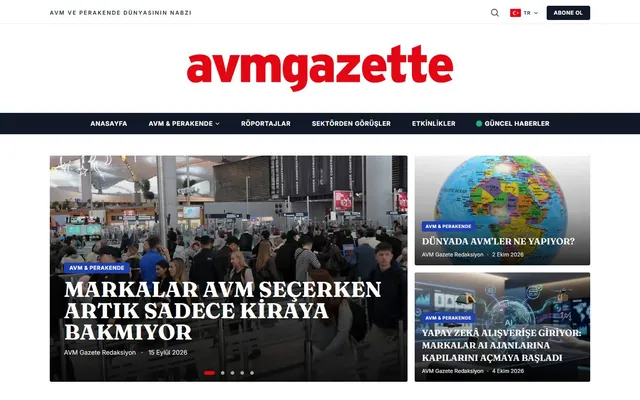
  • AVM Gazette — A news portal covering shopping centres, retail and commercial real estate, built by us as custom software. It includes a subscription system and KVKK-compliant cookie management; in a system that holds subscriber data, data protection is a design topic from the first line of code.
  • Lisansimo — A WooCommerce shop selling digital licences, developed by us. In a store with a payment flow, security means protecting the checkout step, order data and administrator access.

We share these projects as examples of security built in from the start, not as sites that were hacked or recovered. In an attack, the method we apply is the four-step process described above.

Cleaning a site without closing the entry point only buys the attacker time to come back.

// Who does the work, and when is it not needed?

The response is led by Caner Zep Çelik, Founder & Technical Consultant of Zep Bilişim. Since 2020 he has worked on more than 100 projects for clients in the United Kingdom, Turkey and Germany; he examines server logs, code and databases himself and does not subcontract the work. He also writes the root-cause report.

If there are no symptoms, Search Console shows no security issues and the software is kept up to date, emergency response is not needed and a preventive check is enough. If the browser's "Not secure" warning appears only because the SSL certificate has expired, that is not an attack and renewing the certificate solves it. If that is the case, we tell you so in the initial review.

// Selected projects from our references

Some of the sites we have built on different platforms. You can see them all on our references page.

AVM Gazette website home page Custom Software · News Portal · Media

AVM Gazette

Custom-built digital news portal for the shopping mall, retail and commercial real estate sector: categories, headline slider, search, subscriptions and KVKK-compliant cookie consent.

$ visit_site →
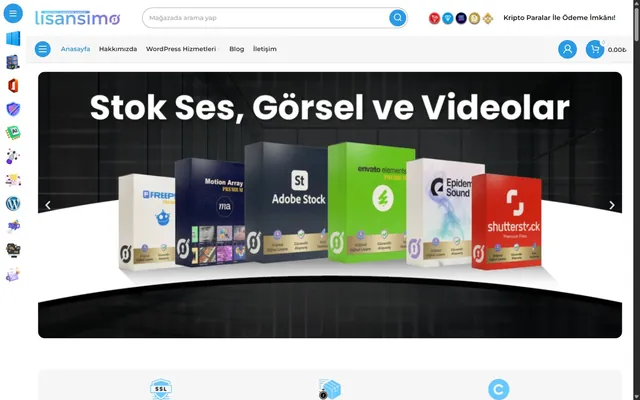
Lisansimo website home page WordPress · WooCommerce · E-Commerce

Lisansimo

Digital licensing and software sales platform - WooCommerce-based e-commerce site.

$ visit_site →
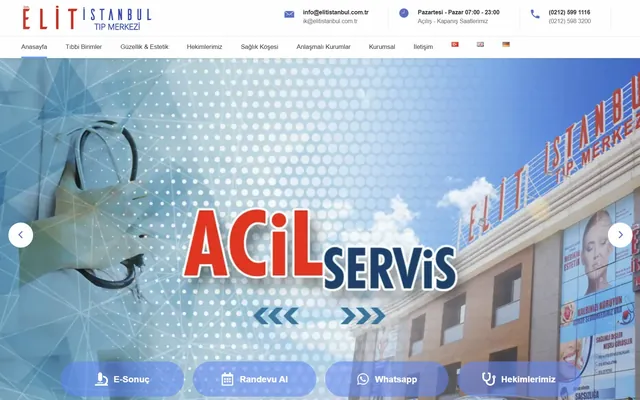
Elit Istanbul Medical Center website home page WordPress · Multilingual · Healthcare

Elit Istanbul Medical Center

Multilingual medical center website with an appointment system, physician profiles and medical-unit integrations.

$ visit_site →

All references →

// Frequently Asked Questions

A hacked website is fixed by first finding the attacker's entry point, then removing malicious files, backdoors and spam pages. All passwords and keys are renewed, the vulnerability is closed and, if Google shows a warning, a review is requested in Search Console. Deleting only the visible malicious files is not enough; while the entry point stays open the site is soon reinfected.

The most reliable signs are the Security Issues report in Search Console and the "This site may be hacked" label in Google results. Unfamiliar pages in a site: search, mobile visitors being redirected, a suspension notice from your host or your emails landing in spam also point to a hack. Redirects may be invisible to you, so request a free initial review if in doubt.

The warning is removed by cleaning the site, closing the vulnerability and then requesting a review from the Security Issues report in Search Console. Google recrawls the site and lifts the warning if it is clean. Reviews usually take a few days for malware and can take several weeks for spam. Incomplete clean-ups are rejected, so we only request a review once verification is finished.

In a typical case, malware removal takes 2 to 3 working days: a response and isolation within the first 4 hours, one day of diagnosis, one day of clean-up and half a day for the report and Google review request. Where the infection went unnoticed for months, generated thousands of spam pages or affects several sites on the same server, the timeline is set in the quote.

Restoring from a backup is not enough on its own, because the backup usually contains the same vulnerability the attacker used. If the attack began before the backup was taken, the backup itself may be infected too. A verified clean backup speeds things up, but unless the entry point is closed, passwords renewed and software updated, the site can be taken over again the same way.

No, no single plugin or tool secures a website by itself. Website security comes from up-to-date software, strong and separate passwords, two-factor authentication, a firewall, security headers and tested backups kept off the server, all working together. On custom software, the code also needs reviewing for SQL injection, XSS and file upload vulnerabilities.

Your next success starts here.

Let's talk about your project. We're here to strengthen your digital infrastructure, lower your costs and increase your productivity. We want to put the experience from over 100 projects to work for your business too.

$ get_quote

Written by: , Founder & Technical Consultant · Last updated: