zep@server: ~/en/services/website-support/website-troubleshooting
$ site debug --logs

Website Troubleshooting & Repair

DNS | HTTP 5xx | SSL | forms
✓ Root cause found, site back online

Website troubleshooting is a technical support service that finds the root cause of a site that will not load, returns error codes, or has a broken form, checkout or booking flow, using server logs and the code itself, and then fixes it for good. When your website is not loading, we respond within 4 hours. We work on WordPress, custom PHP, Node.js / Next.js and static HTML sites.

// Why is my website not loading? Common faults and their likely causes

When a website will not load, the cause almost always sits in one of three layers: the domain and DNS, the server (hosting), or the site's own code. The error message tells you which layer to look at first; the table below maps the symptoms we see most often to their likely causes.

SymptomLikely causeWhere to look first
Site does not load at all, "server not found"Wrong DNS record, expired domain, suspended hosting accountDomain registration and DNS
500 Internal Server ErrorCode error, broken server configuration (.htaccess), PHP version mismatchServer error log
502, 503 or 504 errorApplication process has crashed (Node.js), server resources exhausted, timeoutProcess manager and resource usage
Blank white pageFatal PHP error hidden from the screen, memory limit exceededPHP error log
"Your connection is not private" SSL warningExpired certificate, failed auto-renewal, mixed HTTP/HTTPS contentCertificate and redirects
Contact form emails not arrivingServer mail function instead of SMTP, missing SPF/DKIM, spam filteringMail log and DNS records
Checkout or booking fails part-wayExpired API key, change on the provider's side, JavaScript errorBrowser console and API responses
Layout broken on mobileCSS conflict, stale cached file, newly added contentDevice testing and cache

The MDN HTTP status code reference explains what each status code means in detail.

// What can you check yourself before calling a specialist?

Four quick checks will tell you within minutes whether the problem is on your side, in the network or on the site. None of them can break anything.

  • Try another network — Open the site on mobile data and on a different device; if it only fails on your own network, the problem is most likely your local DNS cache or connection
  • Check the domain expiry date — Look in your registrar's account or, for extensions such as .com, use ICANN Lookup; an expired domain soon becomes completely unreachable
  • Log in to your hosting account — See whether the account is suspended, the disk quota is full or an invoice is unpaid
  • Remember the last change — An update, a new plugin or theme, or a DNS change made just before the fault is often the direct cause; note the time

If all four checks come back clean, if the error code starts with 5, or if a revenue flow such as checkout or bookings has stopped, it is time to call a specialist. Google explains in its Search Central documentation that persistent 5xx errors slow down crawling and can eventually drop pages from the index.

// How does it work when we fix your website, and how long does it take?

Troubleshooting takes four steps; a fault confined to one layer is typically resolved within 1 working day, and problems spanning several layers within 2 to 3 working days. In an emergency we respond within 4 hours. If the site is completely down, we get it back online first; the permanent fix is then tested on a copy of the site (staging), with a backup taken beforehand, and deployed at a low-traffic hour.

01

First response and access (within 4 hours)

We hear the symptoms, obtain server, admin and if needed repository access, and take a backup before touching anything

02

Diagnosis (a few hours to 1 day)

Server and application logs, DNS, SSL and recent changes are examined, and the root cause is written down

03

Fix (half a day to 1 day)

The fix is tested on the copy; related flows such as forms, checkout and login are checked before it goes live

04

Report (on delivery)

What broke and why, what was done, and recommendations to stop it recurring are delivered in writing

// What is included, and what is not?

Troubleshooting is a one-off job; for sites on a monthly maintenance plan it is not charged separately.

TaskOne-off fixWith monthly maintenance
Log review and root-cause analysisIncludedIncluded
DNS, SSL and redirect fixesIncludedIncluded
Code-level debugging (PHP, Node.js, JavaScript)IncludedIncluded
Form email, SMTP, SPF and DKIM setupIncludedIncluded
Checkout, booking and API integration repairIncludedIncluded
Written root-cause reportIncludedIncluded
Continuous uptime monitoring and early warningNot includedIncluded
Hacked site clean-upQuoted separatelyQuoted separately
New feature developmentNot includedNot included
Hosting and domain renewal feesNot includedNot included

If the fault is the result of an attack, the work moves to Website Security & Malware Removal; a repair made without finding the entry point does not last.

// What determines the price?

Three variables set the price: how many layers the fault spans, the platform the site runs on, and whether server and code access are readily available. An expired SSL certificate and a payment error in an undocumented booking system do not involve the same workload, so we quote after a review rather than from a fixed price list.

The initial review is free; the quote is fixed after it and does not go up later. Even in an emergency we tell you what we will do and what it costs, and start once you approve.

// Which platforms do we troubleshoot?

We troubleshoot WordPress / WooCommerce, custom PHP, Node.js / Next.js and static HTML sites; the platform decides where the diagnosis starts.

  • Custom PHP applications — PHP and web server logs are read and the error is traced to the exact line
  • Node.js / Next.js — Process manager logs, build output and environment variables are examined; a 502 error usually means the application has crashed or cannot restart
  • Static HTML — With no server-side code, the problem usually lies with hosting, DNS, SSL or the form delivery service
  • WordPress — Plugin and theme conflicts call for specific expertise; if your site runs on WordPress, our WordPress Technical Support page covers that process in detail

On closed platforms such as Wix, Shopify or Squarespace there is no access to server logs or code, so what we can do is limited. We can help with the domain, DNS, integrations and platform settings; beyond that we refer you to the platform's own support team.

// Why do we know where code tends to break?

We build the same kinds of systems we troubleshoot from scratch, so we look for the weak point by knowing the architecture rather than guessing. The projects below were developed by Zep Bilişim and represent the component types where faults most often appear.

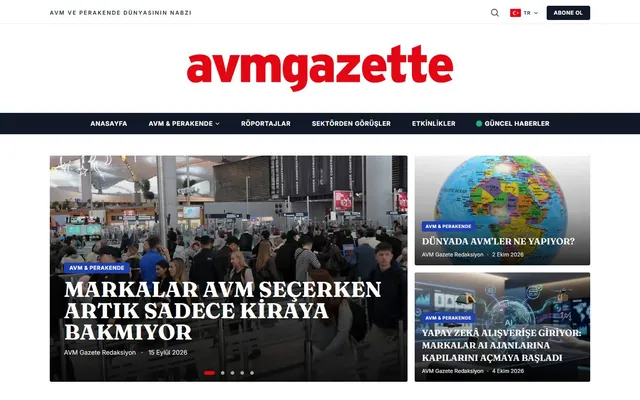
  • AVM Gazette — A news portal we built as custom software, not WordPress: category structure, headline slider, search, subscriptions and cookie management compliant with KVKK, Turkey's data protection law. On portals like this, search queries, subscription emails and caching are where faults most often surface
  • Luxury Airport Shuttle — A corporate site with a booking system that we developed for luxury Istanbul airport transfers. In a booking flow, date validation, notification emails and form submission are the links where a failure means lost business
Hiding an error message is not fixing the error. Any fix made without a written root cause brings the same fault back with the next update.

// Who does the work, and when is it not needed?

Troubleshooting is carried out by Caner Zep Çelik, founder of Zep Bilişim. As Founder & Technical Consultant he has worked on custom software, WordPress and server configuration since 2020 and has been involved in more than 100 projects. He reads the logs and makes the fix himself, and does not subcontract the work.

If the problem only appears on your own computer or network, or your host has announced a general outage, you do not need troubleshooting. If faults keep recurring and appear somewhere different each time, regular monitoring under Website Maintenance & Support costs less than repairing them one by one.

// Selected projects from our references

Some of the sites we have built on different platforms. You can see them all on our references page.

AVM Gazette website home page Custom Software · News Portal · Media

AVM Gazette

Custom-built digital news portal for the shopping mall, retail and commercial real estate sector: categories, headline slider, search, subscriptions and KVKK-compliant cookie consent.

$ visit_site →


Luxury Airport Shuttle website home page Web Design · Booking · Tourism

Luxury Airport Shuttle

Corporate website with a booking system for an Istanbul airport luxury transfer service.

$ visit_site →
Ergoterapistimle website home page Web Design · Healthcare · Booking

Ergoterapistimle

Modern, appointment-focused corporate website design and development for a pediatric and occupational therapy center for children.

$ visit_site →

All references →

// Frequently Asked Questions

When a website is not loading, the cause is usually in one of three places: an expired domain or wrong DNS record, hosting that is suspended or out of resources, or an error in the site's code. First try the site on mobile data from another device, then check the domain expiry date and your hosting account. If those are clean, the server log needs examining.

A 500 error means the server hit an unexpected problem while handling the request, and the real cause is written in the server error log. The most common causes are a broken .htaccess configuration, a PHP version mismatch and a code error introduced by a recent update. Changing files without reading the log makes diagnosis harder; rolling back the last change is often the quickest first step.

A blank white page usually means a fatal PHP error that is hidden from the screen, or an exceeded memory limit. The error log in your hosting account shows which file stopped on which line. On WordPress sites the trigger is usually a plugin or theme update; on custom software, old functions that stop working after a PHP version change are common.

This warning usually means the SSL certificate has expired or automatic renewal has failed. The certificate is renewed, checked to cover both the www and non-www versions of the domain, and any HTTP links on the page are switched to HTTPS. If the warning persists while the certificate is valid, the problem most likely lies in a redirect or in mixed HTTP/HTTPS content.

Form emails are often sent through the server's own mail function without authentication, so they land in spam or never arrive. The fix is to send them via SMTP and add SPF and DKIM records to the domain. First check your spam folder and whether the form shows a success message after sending; if it does not, the problem is in the form itself.

In an emergency we respond within 4 hours. A fault confined to one layer is typically resolved within 1 working day, while problems affecting DNS, the server and the code together take 2 to 3 working days. If the site is completely down, we get it back online first and then make the permanent fix, tested on a copy of the site.

Your next success starts here.

Let's talk about your project. We're here to strengthen your digital infrastructure, lower your costs and increase your productivity. We want to put the experience from over 100 projects to work for your business too.

$ get_quote

Written by: , Founder & Technical Consultant · Last updated: