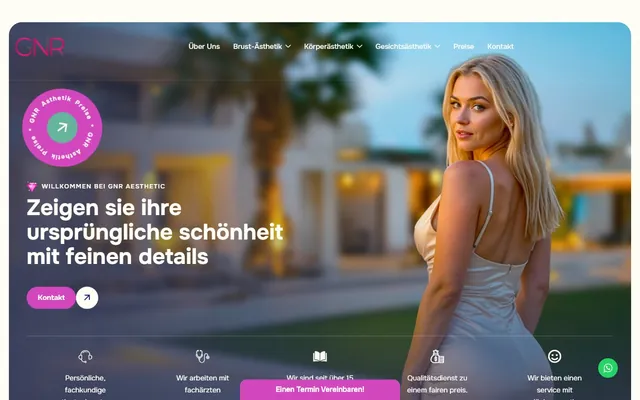
 WordPress · German · Esthetics
GNR Ästhetik
German-language corporate website development for a Germany-based esthetic clinic.
$ visit_site →Website migration is the service of moving your site, with its files, database, email accounts and SSL certificate, from one server to another without downtime or data loss. Where needed, we handle the domain transfer, the DNS cutover and a 301 redirect map for changed URLs in the same plan. We migrate WordPress, custom PHP, Node.js and static sites, always testing on staging first.
Website migration services are for businesses that have outgrown their server or their hosting provider. The move itself carries risk: lost emails, broken forms and falling rankings usually come from unplanned migrations. If one of these sounds familiar, it is time for a planned move.
A server move, a domain transfer and a URL change are separate jobs; to keep the risks apart, we usually schedule them as separate steps.
A migration covers every component the site needs to run, not just its files. The table shows what a standard migration includes and excludes, so the boundaries are clear before you accept a quote.
| Task | Status |
|---|---|
| Moving files and database, with integrity checks | Included |
| DNS record inventory and cutover (A, CNAME, MX, TXT) | Included |
| Preserving email records (MX, SPF, DKIM, DMARC) | Included |
| SSL certificate installation and HTTPS redirects | Included |
| Testing cron jobs, forms and payment integrations | Included |
| Domain transfer between registrars | Included |
| 301 redirect map where URLs change | Included |
| 7 days of post-migration monitoring | Included |
| Copying mailbox contents to the new server | Quoted separately |
| New hosting and domain subscription fees | Not included |
| Redesigning the site or rewriting its code | Not included |
A domain transfer changes the registrar that manages your domain; done properly, neither the website nor email goes offline, because the transfer does not change where the domain points (its DNS). For generic domains (.com, .net, .org) the process follows ICANN rules:
Country-code domains follow their own registry rules. A .uk domain, for example, has no auth code and is moved by changing its IPS tag at Nominet. We confirm the current rules before starting and never leave a transfer to the week before expiry.
On a server move, the critical moment is the DNS cutover. We lower record TTLs to 300 seconds 24 to 48 hours beforehand, so the new address propagates within minutes and fewer visitors are left on cached records. MX, SPF, DKIM and DMARC records are listed before the move and recreated exactly. If mailboxes are moving too, both servers are checked during the cutover window so no message falls through the gap.
The process has four steps and takes 2 to 4 working days for a typical site; a domain transfer, if needed, runs in parallel. The site is first tested on the new server at a temporary address, then switched over at a low-traffic hour. A full backup is taken beforehand and the old server stays live until the 7-day monitoring period ends, so if anything goes wrong, pointing DNS back takes minutes.
File and database size, DNS records, email accounts, cron jobs and integrations are listed; a cutover plan and a rollback plan are written
The site is installed on the new server and SSL prepared; forms, payments, outgoing email and the admin area are tested end to end on a temporary address
The final data delta is synced, DNS is switched to the new server, and SSL and redirects go live at the same time
404 logs, email delivery, cron runs and Search Console crawling are watched; only then is the old server switched off
If URLs stay the same, a server move on its own does not affect rankings; the risk starts when the URL structure or the domain changes. In that case every old URL is redirected one by one to its new equivalent with a 301; pointing everything at the homepage throws away the value of the pages that rank. If the domain changes, we notify Google through the Change of Address tool in Search Console and submit the new sitemap.
The map is built from crawled URLs, pages with Search Console traffic and URLs with external links. Google's guide to site moves with URL changes recommends keeping redirects in place for at least a year, so we advise renewing the old domain for at least that long. Crawling and indexing issues that surface during a move are handled under technical SEO.
Multilingual sites add another layer: language URLs and hreflang tags depend on one another, so one broken link breaks the pairing for every language. Two of our projects illustrate this:
A migration is not judged on cutover day; it is judged by the 404 logs, email delivery and Search Console data in the days that follow.
Our migration service is platform-independent: if we can get server access, we can move it. Each stack has different moving parts:
If your site runs on WordPress, see WordPress migration for the plugin, theme and WooCommerce-specific steps. On closed platforms such as Wix, Shopify and Squarespace there is no server access, so what we can do is limited: we can move the domain and DNS, but the site cannot be exported as files that run on another server. Leaving these platforms usually means rebuilding the site, in which case website redesign is the better starting point.
Four variables set the price: the platform and data size, the number of email accounts and mailbox contents, whether URLs or the domain change, and the number of integrations. A static brochure site on the same domain is a very different workload from a multilingual site moving to a new domain with a full 301 map, so we quote from a review, not a price list.
The pre-migration review is free; the quote is fixed after the review and does not go up later. If the review shows that slowness comes from the pages rather than the server, we say so plainly and suggest website speed optimisation as a separate step.
Migrations are led by Caner Zep Çelik, Founder & Technical Consultant at Zep Bilişim. Since 2020 he has worked on server configuration, DNS and multilingual infrastructure across more than 100 projects in the UK, Turkey and Germany. He carries out the review, the DNS cutover and the redirect map himself and does not subcontract the work.
Migration does not fix every kind of slowness. If the problem lies in the code, heavy images or plugin load, a new server will not close the gap; we measure this during the review and do not recommend a move you do not need. A higher plan with your current host, or a PHP update, is often enough. If you only want your domain at a different registrar, it can be transferred without touching the server at all.
Some of the sites we have built on different platforms. You can see them all on our references page.
WordPress · German · Esthetics
German-language corporate website development for a Germany-based esthetic clinic.
$ visit_site → Web Design · Multilingual · Esthetics
Premium trilingual (TR/EN/DE) corporate website for a cosmetic surgery clinic specializing in face, breast and body aesthetics.
$ visit_site → WordPress · Multilingual · Healthcare
Multilingual corporate website with appointment forms for an oral and dental health clinic.
$ visit_site →No, a planned migration does not take the site offline. The site is first installed on the new server and tested at a temporary address, and DNS is only switched once everything works. While DNS propagates, some visitors see the old server and some the new one, and both are working. For shops and booking sites we schedule a short maintenance window at a low-traffic hour to avoid order conflicts.
A generic domain (.com, .net) usually transfers within 5 to 7 days once the auth code has been entered and the request approved. The website and email keep working throughout, because the transfer does not change DNS records. Domains registered or transferred within the last 60 days cannot be transferred. Country-code domains follow their own registry rules; .uk domains, for instance, move by changing the IPS tag.
If URLs stay the same, a server move on its own does not affect rankings. If the URL structure or domain changes, every old URL is 301-redirected to its new equivalent and the change of address is reported in Search Console. Temporary fluctuation is possible; with a complete redirect map, traffic usually returns to its previous level within a few weeks. We do not guarantee rankings, but we report the monitoring results to you.
No. MX, SPF, DKIM and DMARC records are listed before the move and recreated exactly on the new setup. If your email is already hosted with a separate provider, the migration does not touch it at all. If mailbox contents on the server need to move too, this is planned as a separate step and shown separately in the quote. Delivery is verified with test messages on the first day.
The auth code comes from the registrar where your domain is currently held, either in its control panel or from its support team. The transfer lock must be removed first. The code is entered when the transfer is started at the new registrar, after which an approval email goes to the registrant. Some country-code domains work differently: .uk domains have no auth code and are moved by changing the IPS tag.
The cost depends on the platform, the data size, the number of email accounts, whether URLs or the domain change, and how many integrations the site has. That is why we quote from a review rather than a fixed price list. The review is free, and the quote is fixed afterwards and does not go up later. Hosting and domain subscription fees are not included and are paid directly to the provider.
Zero-downtime moves for WordPress and WooCommerce, with plugin, theme and database-specific steps.
View details → SEO OptimisationCrawling, indexing, redirect and hreflang checks before and after a site move.
View details → Web DesignRebuilding an ageing site with a new design and stack while protecting the pages that already rank.
View details →Written by: Caner Zep Çelik, Founder & Technical Consultant · Last updated: